GameBuff トム・クランシーズ ゴーストリコン ブレイクポイント トレーナー アンチチート操作手順
リリース時間 2025/07/09
Steamプラットフォーム
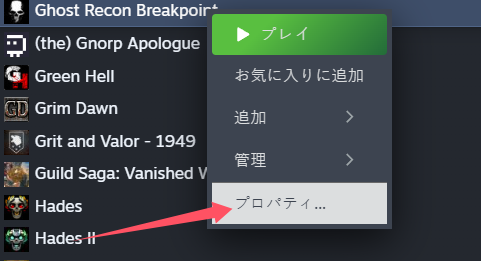
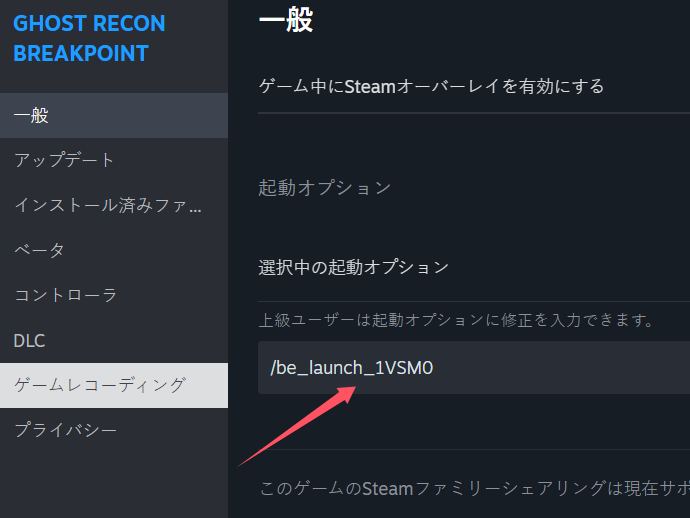
Steam内のゲームを右クリックし、「プロパティ」へ移動します。「全般」タブで起動オプションに `/be_launch_1VSM0` を入力し、その後「ゲームを開始」をクリックしてください。
Uplayプラットフォーム
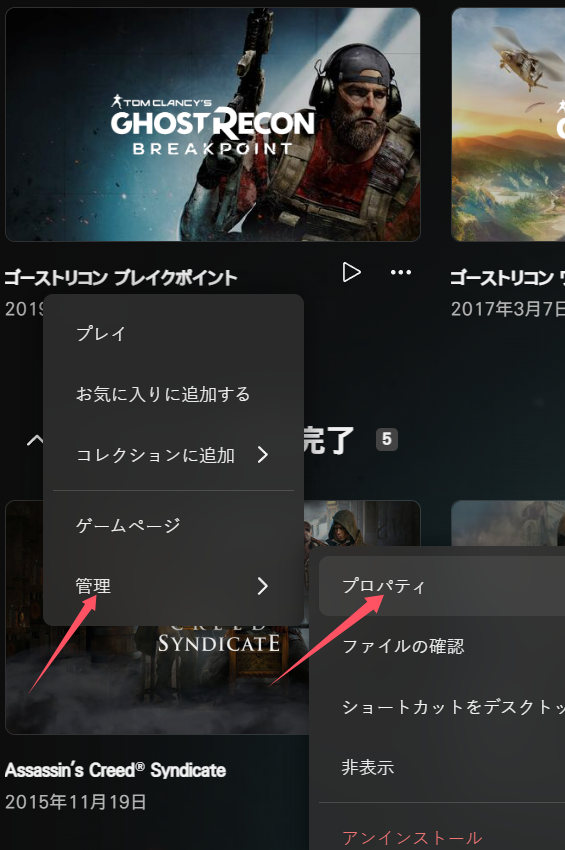
Uplayのゲームライブラリでゲームを右クリックし、「管理」→「プロパティ」を選択します。「全般」セクションで起動パラメータに `/be_launch_1VSM0` を追加し、「保存」をクリックしてください。
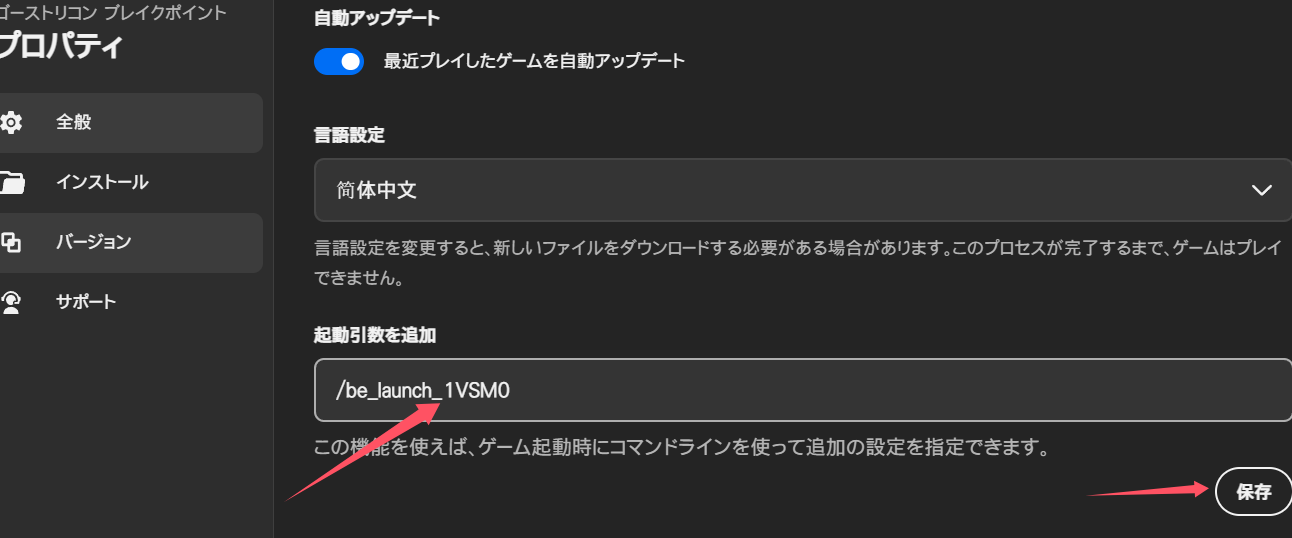
Epicプラットフォーム
1. まずアンチチートファイルをダウンロードしてください。下記の「アンチチートをダウンロード」リンクをCtrlキーを押しながらクリックするか、URLをブラウザにコピーしてダウンロードしてください。
https://dl.gamebuff.cn/tools/GRB_BE.zip
2. ダウンロードが完了したら、デスクトップまたは他のフォルダに解凍してください。
3. 解凍したファイルの中にある `GRB_BE.exe` を、ゲームのルートディレクトリ(Ghost Recon Breakpoint)内の指定場所にコピーしてください。
4. コピー後は上書きを選択し、その後 `GRB_BE.exe` をダブルクリックして実行してください。
- Terraria
- Phasmophobia
- PEAK
- Assassin's Creed Valhalla
- Europa Universalis 5
- ELDEN RING
- Infection Free Zone
- Sid Meier's Civilization VI
- Sons of The Forest
- Assetto Corsa Rally
- Wall World 2
- MONSTER HUNTER RISE
- Need for Speed Unbound
- Crusader Kings III
- ICARUS
- Hearts of Iron IV
- SWORD ART ONLINE Fractured Daydream
- Hogwarts Legacy
- No Man's Sky
- Detroit: Become Human
- Age of Wonders 4
- INAZUMA ELEVEN: Victory Road
- Total War: Warhammer III
- STAR WARS™: Battlefront Classic Collection
- The Witcher 3: Wild Hunt - Remastered
- Escape the Backrooms
- The First Berserker: Khazan
- Red Dead Redemption 2
- R.E.P.O.
- The Outer Worlds 2
- Nioh 2 – The Complete Edition
- Grand Theft Auto V Legacy
- PowerWash Simulator 2
- Europa Universalis V
- Assassin's Creed Odyssey
- Monster Hunter: World
- Sekiro Shadows Die Twice
- Dispatch
- Cyberpunk 2077
- Metaphor: ReFantazio
- Super Fantasy Kingdom
- Football Manager 26
- Dead Island 2
- The Elder Scrolls V: Skyrim Special Edition(steam)
- Dark Souls 3
- God of War
- Stardew Valley
- STAR WARS Zero Company
