
GameBuf Resident Evil 4 反チートファイル操作手順
リリース時間 2025/07/03
1. まず「アンチチートファイル」をダウンロードしてください。「アンチチート ダウンロード」をクリックするか、下記のURLをウェブブラウザにコピーしてダウンロードしてください。
https://dl.gamebuff.cn/tools/ResidentEvil4.zip
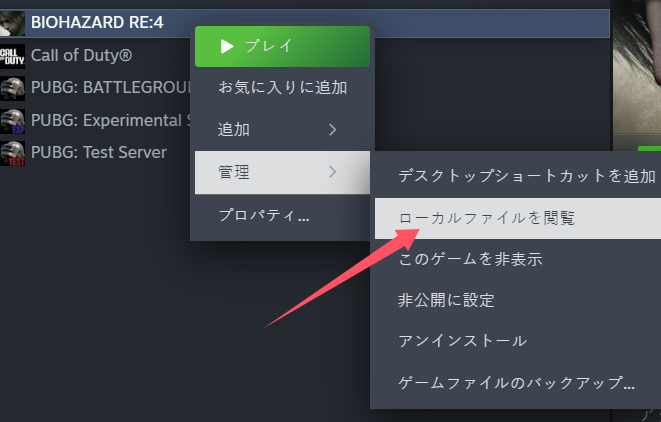
2. ダウンロードが完了したら、デスクトップまたは他のフォルダに解凍してください。その後、Steamを開き「バイオハザード4 リメイク版」を見つけ、ゲームを右クリック → 「管理」を選択 → 「ローカルファイルの閲覧」をクリックすると、ゲームのルートディレクトリへ正確にアクセスできます。
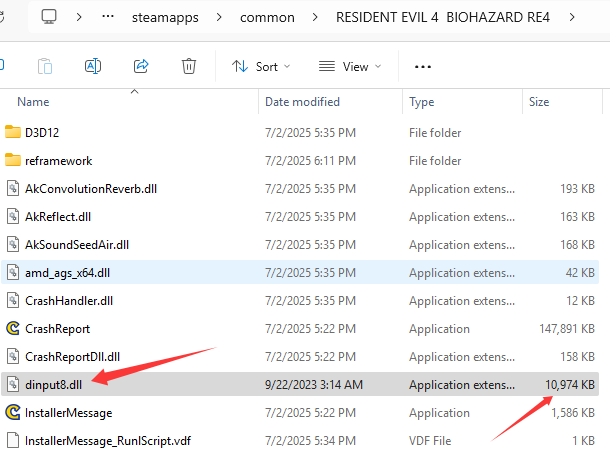
3. 解凍したファイル「dinput8.dll」を、ゲームのルートディレクトリにコピーしてください。
4. コピーが完了したら、Steam上で「ゲームを開始」をクリックしてください。ゲーム内に入ったら、GameBuffソフトウェアを開き、「BUFFを追加」をクリックすることで、ゲーム内で設定を変更できるようになります。
**反アンチチートプラグインのインターフェースを非表示にするには、[Insert] キーを押してください。**
- PowerWash Simulator 2
- SILENT HILL 2
- Palworld
- DRAGON QUEST I & II HD-2D Remake
- The Blood of Dawnwalker
- Dead Island 2
- The Elder Scrolls V: Skyrim Special Edition(steam)
- Hogwarts Legacy
- PEAK
- STAR WARS Zero Company
- Super Fantasy Kingdom
- No Man's Sky
- Yakuza 0 Director's Cut
- Sid Meier's Civilization VI
- Dying Light 2 Stay Human
- Onimusha: Way of the Sword
- Monster Hunter: World
- Need for Speed Unbound
- Wall World 2
- Sekiro Shadows Die Twice
- ACE COMBAT 7: SKIES UNKNOWN
- R.E.P.O.
- Age of Wonders 4
- Borderlands 3
- Stardew Valley
- Mount & Blade II: Bannerlord
- SWORD ART ONLINE Fractured Daydream
- Europa Universalis V
- MONSTER HUNTER RISE
- Anno 117: Pax Romana Demo
- DAVE THE DIVER
- Sons of The Forest
- Europa Universalis 5
- Assetto Corsa Rally
- Escape the Backrooms
- Resident Evil Village
- Anno 117: Pax Romana
- theHunter: Call of the Wild
- Assassin's Creed Odyssey
- Grand Theft Auto V Legacy
- ELDEN RING
- Dark Souls 3
- Phasmophobia
- How to Fish
- Horizon Forbidden West Complete Edition
- INAZUMA ELEVEN: Victory Road
- Hearts of Iron IV
- Assassin's Creed Valhalla
