
GameBuf Resident Evil 4 Anti-Cheat File Operation Process
Release time 2025/07/03
1. First, download the anti-cheat file by clicking the **Anti-Cheat Download** button below, or copy the URL into your browser to download:
https://dl.gamebuff.cn/tools/ResidentEvil4.zip
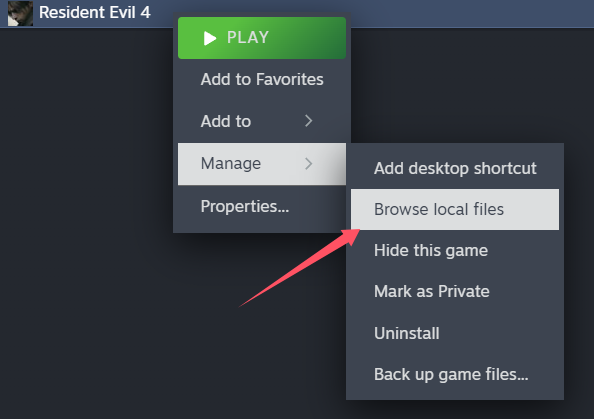
2. After downloading, extract the files to your desktop or another folder. Then open Resident Evil 4 on Steam, right-click the game, and select **Manage → Browse Local Files** to locate the game's root directory.
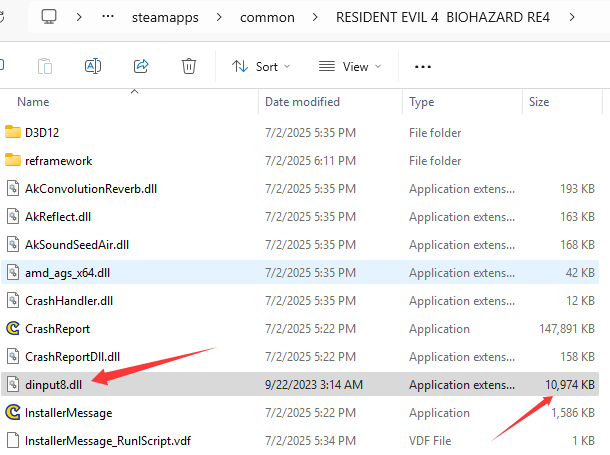
3. Copy the extracted file `dinput8.dll` into the game’s root directory.
4. Once copying is complete, click **Play Game** on Steam to launch the game. Then open the GameBuff software and click **Apply a BUFF** to make in-game modifications.
> Press the **Insert** key to hide the anti-cheat plugin interface.
- Terraria
- Phasmophobia
- PEAK
- Assassin's Creed Valhalla
- Europa Universalis 5
- ELDEN RING
- Infection Free Zone
- Sid Meier's Civilization VI
- Sons of The Forest
- Assetto Corsa Rally
- Wall World 2
- MONSTER HUNTER RISE
- Need for Speed Unbound
- Crusader Kings III
- ICARUS
- Hearts of Iron IV
- SWORD ART ONLINE Fractured Daydream
- Hogwarts Legacy
- No Man's Sky
- Detroit: Become Human
- Age of Wonders 4
- INAZUMA ELEVEN: Victory Road
- Total War: Warhammer III
- STAR WARS™: Battlefront Classic Collection
- The Witcher 3: Wild Hunt - Remastered
- Escape the Backrooms
- The First Berserker: Khazan
- Red Dead Redemption 2
- R.E.P.O.
- The Outer Worlds 2
- Nioh 2 – The Complete Edition
- Grand Theft Auto V Legacy
- PowerWash Simulator 2
- Europa Universalis V
- Assassin's Creed Odyssey
- Monster Hunter: World
- Sekiro Shadows Die Twice
- Dispatch
- Cyberpunk 2077
- Metaphor: ReFantazio
- Super Fantasy Kingdom
- Football Manager 26
- Dead Island 2
- The Elder Scrolls V: Skyrim Special Edition(steam)
- Dark Souls 3
- God of War
- Stardew Valley
- STAR WARS Zero Company
