
GTA5 Grand Theft Auto V wie man BE Anti-Cheat deaktiviert
Freigabezeit 2025/07/04
Methode 1: Einstellungen über Steam
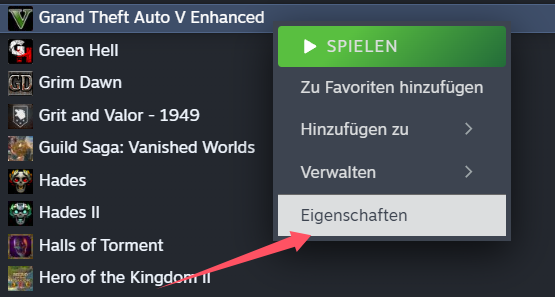
Klicken Sie mit der rechten Maustaste auf GTA V – Grand Theft Auto 5 in Ihrer Steam-Bibliothek und wählen Sie Eigenschaften.
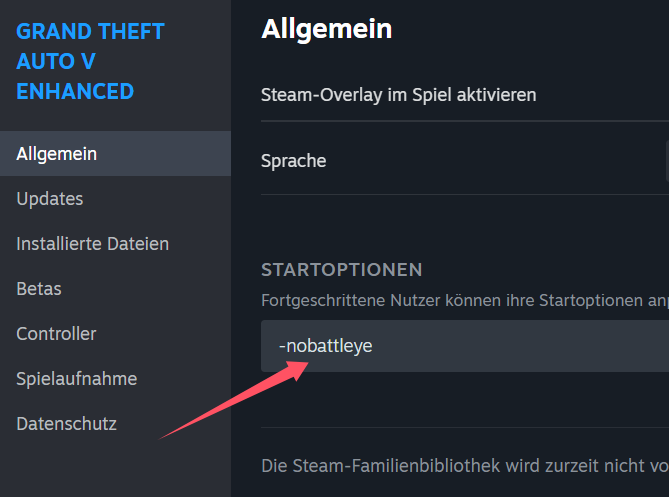
Gehen Sie zum Tab Allgemein und klicken Sie auf Startoptionen festlegen.
Fügen Sie im Feld Startparameter folgenden Befehl hinzu (achten Sie auf das Leerzeichen vor dem Befehl):
-nobattleye
---
Methode 2: Einstellungen im Rockstar Games Launcher
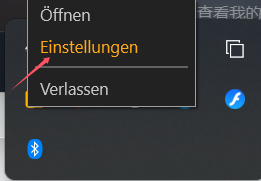
Öffnen Sie den Rockstar Games Launcher über das Taskleisten-Symbol.
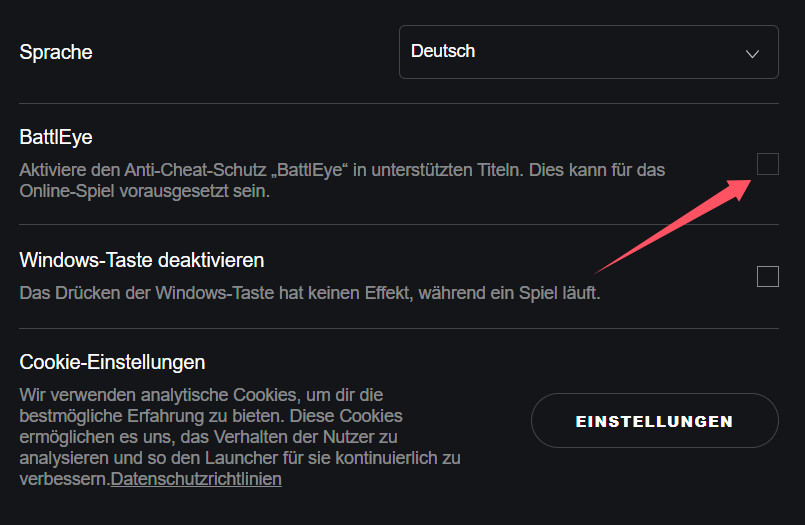
Gehen Sie zu Einstellungen > Launcher-Einstellungen und deaktivieren Sie die Option:
BattlEye Anti-Cheat aktivieren.
---
Nachdem Sie eine der beiden Methoden durchgeführt haben, starten Sie das Spiel neu.
Sobald Sie im Spiel sind, öffnen Sie die GameBuff-Software und klicken Sie auf „Etwas BUFF hinzufügen“, um Änderungen innerhalb des Spiels vorzunehmen.
- PowerWash Simulator 2
- SILENT HILL 2
- Palworld
- DRAGON QUEST I & II HD-2D Remake
- The Blood of Dawnwalker
- Dead Island 2
- The Elder Scrolls V: Skyrim Special Edition(steam)
- Hogwarts Legacy
- PEAK
- STAR WARS Zero Company
- Super Fantasy Kingdom
- No Man's Sky
- Yakuza 0 Director's Cut
- Sid Meier's Civilization VI
- Dying Light 2 Stay Human
- Onimusha: Way of the Sword
- Monster Hunter: World
- Need for Speed Unbound
- Wall World 2
- Sekiro Shadows Die Twice
- ACE COMBAT 7: SKIES UNKNOWN
- R.E.P.O.
- Age of Wonders 4
- Borderlands 3
- Stardew Valley
- Mount & Blade II: Bannerlord
- SWORD ART ONLINE Fractured Daydream
- Europa Universalis V
- MONSTER HUNTER RISE
- Anno 117: Pax Romana Demo
- DAVE THE DIVER
- Sons of The Forest
- Europa Universalis 5
- Assetto Corsa Rally
- Escape the Backrooms
- Resident Evil Village
- Anno 117: Pax Romana
- theHunter: Call of the Wild
- Assassin's Creed Odyssey
- Grand Theft Auto V Legacy
- ELDEN RING
- Dark Souls 3
- Phasmophobia
- How to Fish
- Horizon Forbidden West Complete Edition
- INAZUMA ELEVEN: Victory Road
- Hearts of Iron IV
- Assassin's Creed Valhalla
