
GTA5 Grand Theft Auto V comment désactiver l'anti-triche BE
Heure de sortie 2025/07/04
Méthode 1 : Paramétrer via Steam
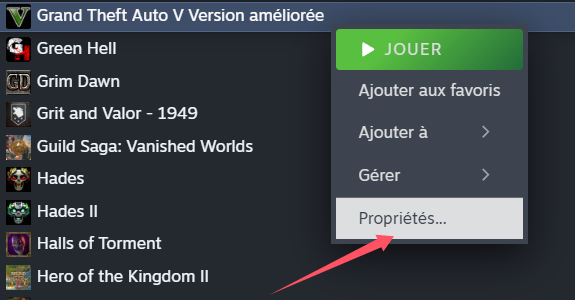
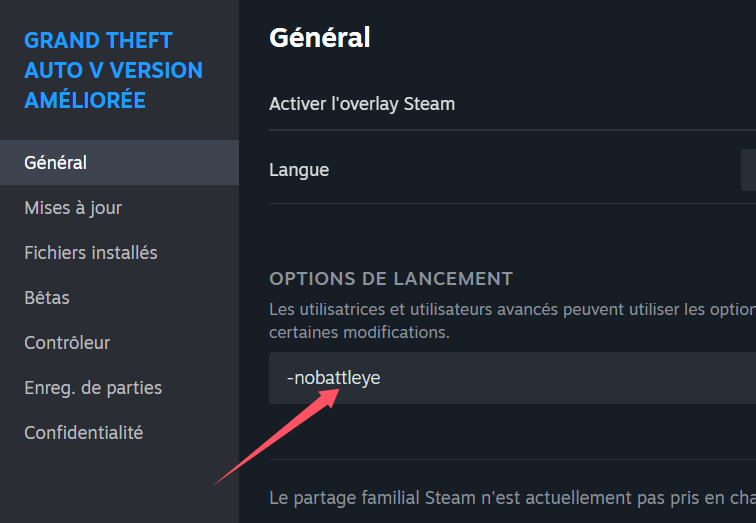
Faites un clic droit sur Grand Theft Auto V (GTA 5) dans votre bibliothèque Steam → Propriétés → Onglet Général → Cliquez sur Définir les options de lancement.
Ajoutez le paramètre suivant dans la case :
-nobattleye
,⚠️ Attention : Il y a un espace avant `-nobattleye`.
---
Méthode 2 : Désactiver BattlEye via le lanceur Rockstar
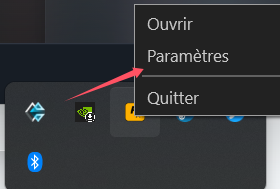
Ouvrez le Rockstar Games Launcher, cliquez sur Paramètres (Settings) dans le menu du haut, puis allez dans Paramètres du lanceur (Launcher Settings).
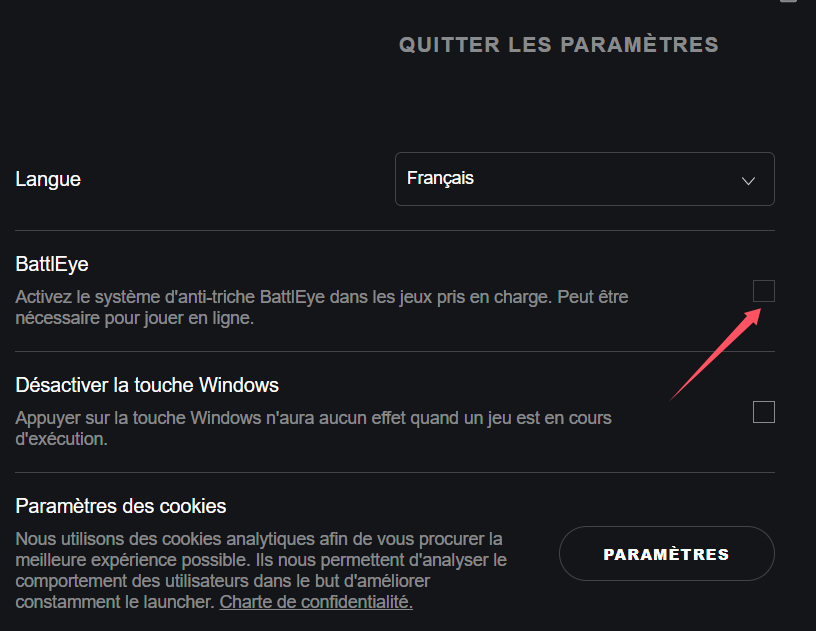
Dans cette section, décochez l’option BattlEye Anti-Cheat Service.
Après avoir effectué les réglages :
Redémarrez le jeu. Une fois dans le jeu, lancez le logiciel GameBuff et cliquez sur « Ajouter un BUFF » pour effectuer des modifications en jeu.
- PowerWash Simulator 2
- SILENT HILL 2
- Palworld
- DRAGON QUEST I & II HD-2D Remake
- The Blood of Dawnwalker
- Dead Island 2
- The Elder Scrolls V: Skyrim Special Edition(steam)
- Hogwarts Legacy
- PEAK
- STAR WARS Zero Company
- Super Fantasy Kingdom
- No Man's Sky
- Yakuza 0 Director's Cut
- Sid Meier's Civilization VI
- Dying Light 2 Stay Human
- Onimusha: Way of the Sword
- Monster Hunter: World
- Need for Speed Unbound
- Wall World 2
- Sekiro Shadows Die Twice
- ACE COMBAT 7: SKIES UNKNOWN
- R.E.P.O.
- Age of Wonders 4
- Borderlands 3
- Stardew Valley
- Mount & Blade II: Bannerlord
- SWORD ART ONLINE Fractured Daydream
- Europa Universalis V
- MONSTER HUNTER RISE
- Anno 117: Pax Romana Demo
- DAVE THE DIVER
- Sons of The Forest
- Europa Universalis 5
- Assetto Corsa Rally
- Escape the Backrooms
- Resident Evil Village
- Anno 117: Pax Romana
- theHunter: Call of the Wild
- Assassin's Creed Odyssey
- Grand Theft Auto V Legacy
- ELDEN RING
- Dark Souls 3
- Phasmophobia
- How to Fish
- Horizon Forbidden West Complete Edition
- INAZUMA ELEVEN: Victory Road
- Hearts of Iron IV
- Assassin's Creed Valhalla
