
GameBuffストリートファイター6アンチチートファイル操作手順
リリース時間 2026/07/01
1.まずアンチチートファイルをダウンロードします。以下の「アンチチートダウンロード」をクリックするか、以下のURLをウェブページにコピーしてダウンロードしてください。
https://dl.gamebuff.cn/tools/StreetFighter6.zip
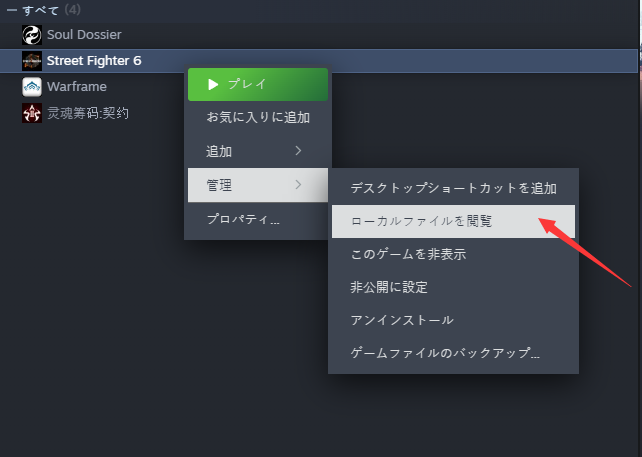
2.ダウンロード後、ファイルをデスクトップなどに解凍し、steamを開いてストリートファイター6を見つけ、ゲームを右クリックし、「管理」に進みます。次に「ローカルファイルを参照」をクリックし、ゲームの正確なルートディレクトリを見つけます。
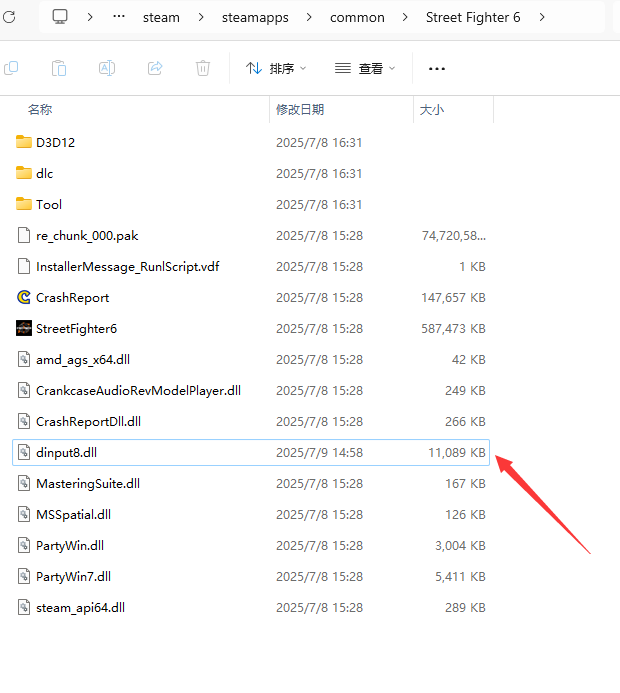
3.抽出したdinput8.dllファイルをゲームのルートディレクトリにコピーします。
4.ファイルをコピーした後、steamのstart gameをクリックし、ゲームに入り、GameBuffソフトウェアを開き、「add a buff」をクリックしてゲームを変更することができます。
アンチチートプラグインのインターフェイスを非表示にするには、Insertキーを押します。
- PowerWash Simulator 2
- SILENT HILL 2
- Palworld
- DRAGON QUEST I & II HD-2D Remake
- The Blood of Dawnwalker
- Dead Island 2
- The Elder Scrolls V: Skyrim Special Edition(steam)
- Hogwarts Legacy
- PEAK
- STAR WARS Zero Company
- Super Fantasy Kingdom
- No Man's Sky
- Yakuza 0 Director's Cut
- Sid Meier's Civilization VI
- Dying Light 2 Stay Human
- Onimusha: Way of the Sword
- Monster Hunter: World
- Need for Speed Unbound
- Wall World 2
- Sekiro Shadows Die Twice
- ACE COMBAT 7: SKIES UNKNOWN
- R.E.P.O.
- Age of Wonders 4
- Borderlands 3
- Stardew Valley
- Mount & Blade II: Bannerlord
- SWORD ART ONLINE Fractured Daydream
- Europa Universalis V
- MONSTER HUNTER RISE
- Anno 117: Pax Romana Demo
- DAVE THE DIVER
- Sons of The Forest
- Europa Universalis 5
- Assetto Corsa Rally
- Escape the Backrooms
- Resident Evil Village
- Anno 117: Pax Romana
- theHunter: Call of the Wild
- Assassin's Creed Odyssey
- Grand Theft Auto V Legacy
- ELDEN RING
- Dark Souls 3
- Phasmophobia
- How to Fish
- Horizon Forbidden West Complete Edition
- INAZUMA ELEVEN: Victory Road
- Hearts of Iron IV
- Assassin's Creed Valhalla
