
GameBuff Halo: The Master Chief Collection Trainer Anti-Cheat Disabilita il Processo Operativo
Tempo di rilascio 2025/07/11
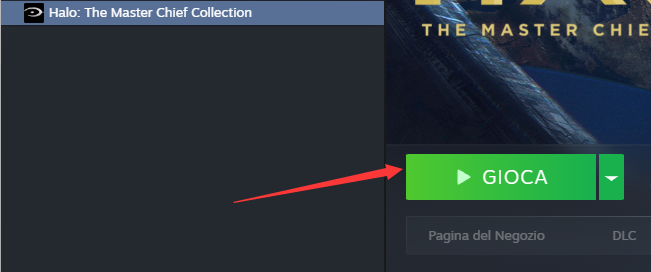
1. Per prima cosa, aprite Steam, trovate il gioco Halo Collection e fate clic su Avvia gioco.
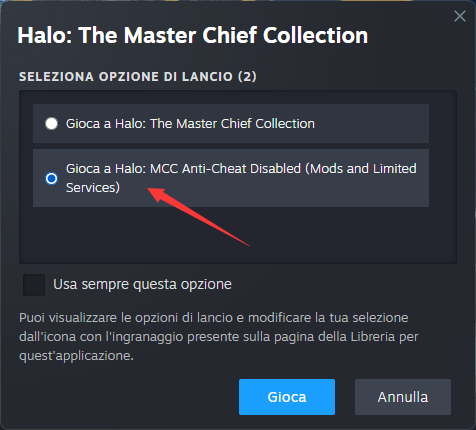
2. Quando appare la finestra seguente, selezionare “Gioca a Halo: MCC Anti-Cheat Disabilitato” e fare clic su “Avvia”.
3. Una volta nel gioco, aprire il software GameBuff e fare clic su “Aggiungi un BUFF” per modificare le impostazioni del gioco.
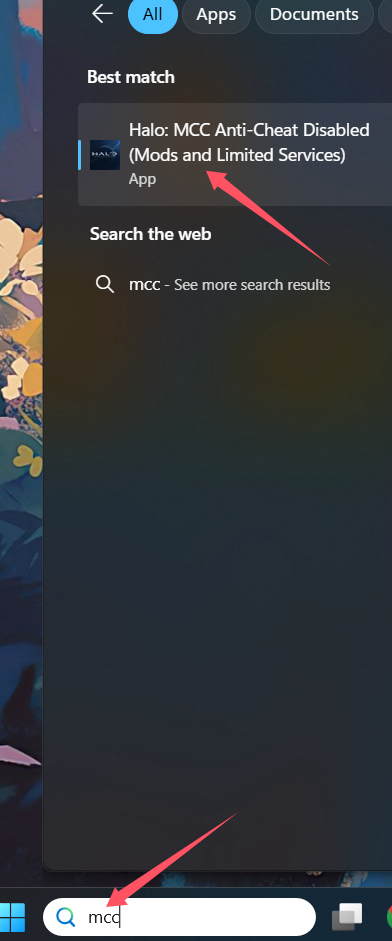
Se stai utilizzando la versione per PC della piattaforma Xbox, segui questi passaggi:
1. Nella barra di ricerca, digita MCC.
2. Trova e seleziona Halo: MCC Anti-Cheat Disabled (Mods and Limited Services).
3. Avvia il gioco da questa opzione.
- PowerWash Simulator 2
- SILENT HILL 2
- Palworld
- DRAGON QUEST I & II HD-2D Remake
- The Blood of Dawnwalker
- Dead Island 2
- The Elder Scrolls V: Skyrim Special Edition(steam)
- Hogwarts Legacy
- PEAK
- STAR WARS Zero Company
- Super Fantasy Kingdom
- No Man's Sky
- Yakuza 0 Director's Cut
- Sid Meier's Civilization VI
- Dying Light 2 Stay Human
- Onimusha: Way of the Sword
- Monster Hunter: World
- Need for Speed Unbound
- Wall World 2
- Sekiro Shadows Die Twice
- ACE COMBAT 7: SKIES UNKNOWN
- R.E.P.O.
- Age of Wonders 4
- Borderlands 3
- Stardew Valley
- Mount & Blade II: Bannerlord
- SWORD ART ONLINE Fractured Daydream
- Europa Universalis V
- MONSTER HUNTER RISE
- Anno 117: Pax Romana Demo
- DAVE THE DIVER
- Sons of The Forest
- Europa Universalis 5
- Assetto Corsa Rally
- Escape the Backrooms
- Resident Evil Village
- Anno 117: Pax Romana
- theHunter: Call of the Wild
- Assassin's Creed Odyssey
- Grand Theft Auto V Legacy
- ELDEN RING
- Dark Souls 3
- Phasmophobia
- How to Fish
- Horizon Forbidden West Complete Edition
- INAZUMA ELEVEN: Victory Road
- Hearts of Iron IV
- Assassin's Creed Valhalla
