
Tutoriel Anti-Triche de JOJO's Bizarre Adventure: All-Star Battle R
Heure de sortie 2025/07/14
1. Cliquez sur l’URL ci-dessous pour télécharger le fichier anti-triche depuis la page web :
2. Décompressez les fichiers sur le bureau ou un dossier. Dans Steam, ouvrez "JoJo's Bizarre Adventure: All-Star Battle R" → clic droit → "Gérer" → "Afficher les fichiers locaux".
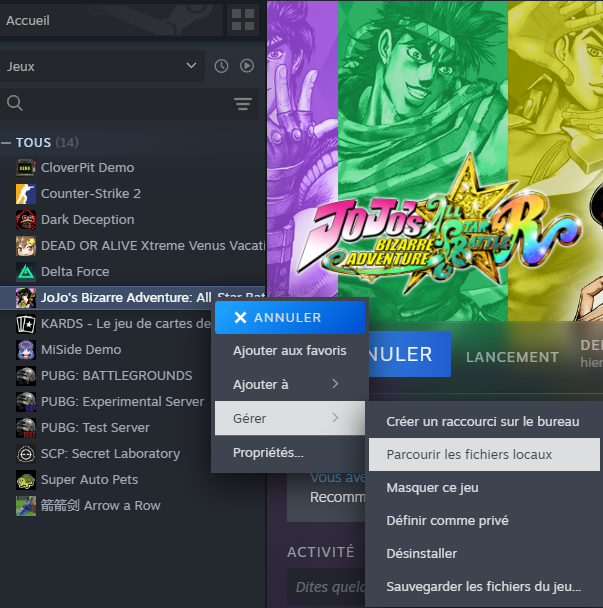
3. Copiez `start_protected_game.exe` dans le dossier "Game" du répertoire racine et remplacez le fichier existant.

4. Lancez le jeu via Steam. Dans GameBuff, cliquez sur "Ajouter un BUFF".
**Note**: Pour restaurer, utilisez "Vérifier l'intégrité des fichiers" ou restaurez depuis une sauvegarde.
- PowerWash Simulator 2
- SILENT HILL 2
- Palworld
- DRAGON QUEST I & II HD-2D Remake
- The Blood of Dawnwalker
- Dead Island 2
- The Elder Scrolls V: Skyrim Special Edition(steam)
- Hogwarts Legacy
- PEAK
- STAR WARS Zero Company
- Super Fantasy Kingdom
- No Man's Sky
- Yakuza 0 Director's Cut
- Sid Meier's Civilization VI
- Dying Light 2 Stay Human
- Onimusha: Way of the Sword
- Monster Hunter: World
- Need for Speed Unbound
- Wall World 2
- Sekiro Shadows Die Twice
- ACE COMBAT 7: SKIES UNKNOWN
- R.E.P.O.
- Age of Wonders 4
- Borderlands 3
- Stardew Valley
- Mount & Blade II: Bannerlord
- SWORD ART ONLINE Fractured Daydream
- Europa Universalis V
- MONSTER HUNTER RISE
- Anno 117: Pax Romana Demo
- DAVE THE DIVER
- Sons of The Forest
- Europa Universalis 5
- Assetto Corsa Rally
- Escape the Backrooms
- Resident Evil Village
- Anno 117: Pax Romana
- theHunter: Call of the Wild
- Assassin's Creed Odyssey
- Grand Theft Auto V Legacy
- ELDEN RING
- Dark Souls 3
- Phasmophobia
- How to Fish
- Horizon Forbidden West Complete Edition
- INAZUMA ELEVEN: Victory Road
- Hearts of Iron IV
- Assassin's Creed Valhalla
