
Friday the 13th Modifier Anti-Cheat Disable Operation Process
Release time 2025/07/10
Step-by-Step Guide
1. First, download the anti-cheat file by clicking on the Anti-Cheat Download link below, or copy the URL into your browser to download:
Anti-Cheat Download
https://dl.gamebuff.cn/tools/Fridaythe13th.zip
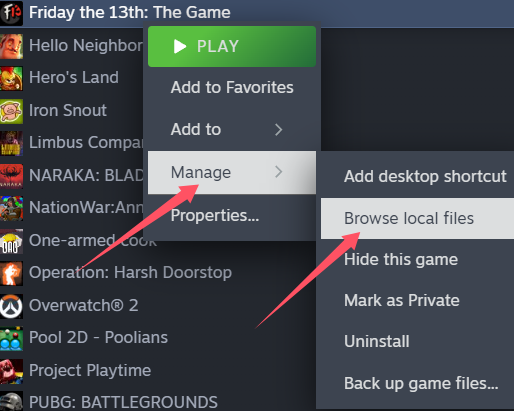
2. After downloading, extract the files to your desktop or another folder. Then open Steam, find Friday the 13th, right-click on it, and select Manage > Browse Local Files.
3. Copy the file EAC_Launcher.exe into the game's directory and replace the existing file.
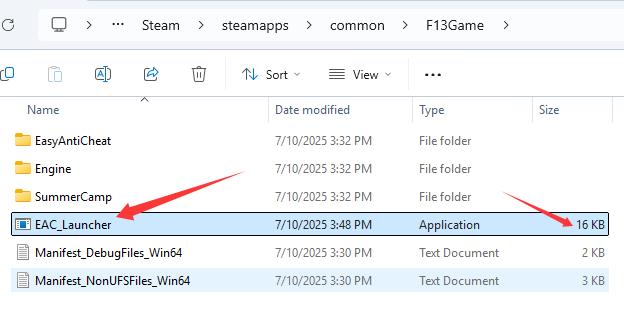
4. Once the file has been copied, click Start Game on Steam. After launching the game, open the GameBuff software and click "Add a BUFF" to make modifications within the game.
- PowerWash Simulator 2
- SILENT HILL 2
- Palworld
- DRAGON QUEST I & II HD-2D Remake
- The Blood of Dawnwalker
- Dead Island 2
- The Elder Scrolls V: Skyrim Special Edition(steam)
- Hogwarts Legacy
- PEAK
- STAR WARS Zero Company
- Super Fantasy Kingdom
- No Man's Sky
- Yakuza 0 Director's Cut
- Sid Meier's Civilization VI
- Dying Light 2 Stay Human
- Onimusha: Way of the Sword
- Monster Hunter: World
- Need for Speed Unbound
- Wall World 2
- Sekiro Shadows Die Twice
- ACE COMBAT 7: SKIES UNKNOWN
- R.E.P.O.
- Age of Wonders 4
- Borderlands 3
- Stardew Valley
- Mount & Blade II: Bannerlord
- SWORD ART ONLINE Fractured Daydream
- Europa Universalis V
- MONSTER HUNTER RISE
- Anno 117: Pax Romana Demo
- DAVE THE DIVER
- Sons of The Forest
- Europa Universalis 5
- Assetto Corsa Rally
- Escape the Backrooms
- Resident Evil Village
- Anno 117: Pax Romana
- theHunter: Call of the Wild
- Assassin's Creed Odyssey
- Grand Theft Auto V Legacy
- ELDEN RING
- Dark Souls 3
- Phasmophobia
- How to Fish
- Horizon Forbidden West Complete Edition
- INAZUMA ELEVEN: Victory Road
- Hearts of Iron IV
- Assassin's Creed Valhalla
