
GameBuff Watch_Dogs2 Modifier Anti-Cheat Disable Operation Process
Release time 2025/07/07
Uplay Version
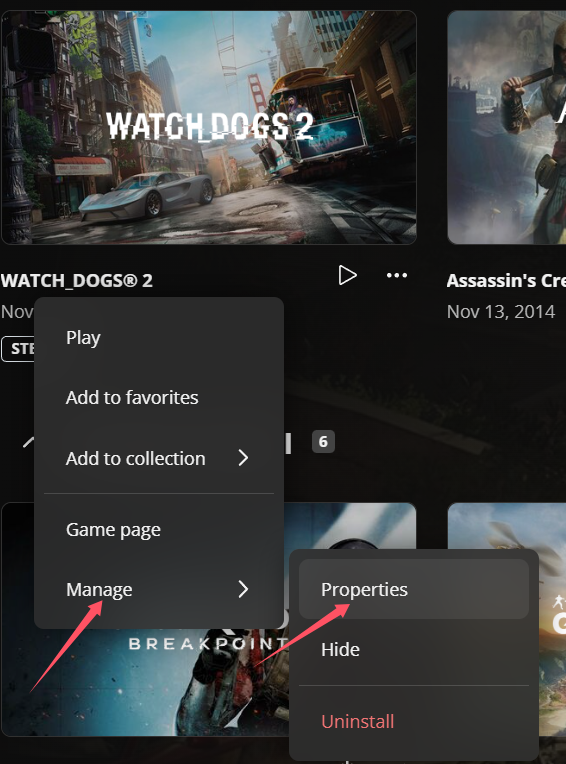
1. Click on "Game Properties" in Uplay, then click on the game's launch parameters.
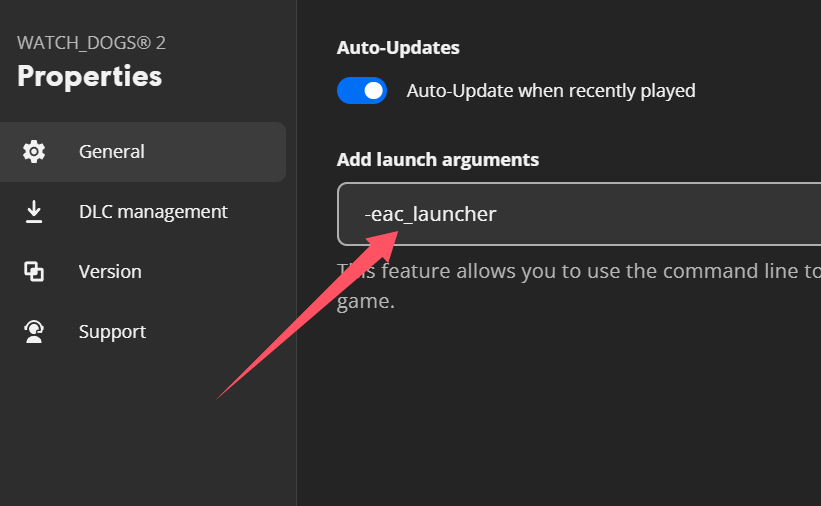
2. Enter -eac_launcher and click save. Note that there is a space before it. After saving, it will look like the image below:
3. Then click "Start Game," enter the game, open the GameBuff software, and click "Add a BUFF" to make modifications within the game.
Steam Version
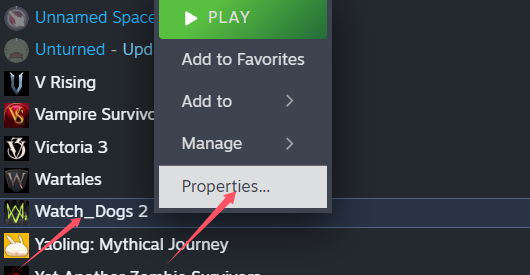
1. Right-click the game in Steam and go to "Properties."
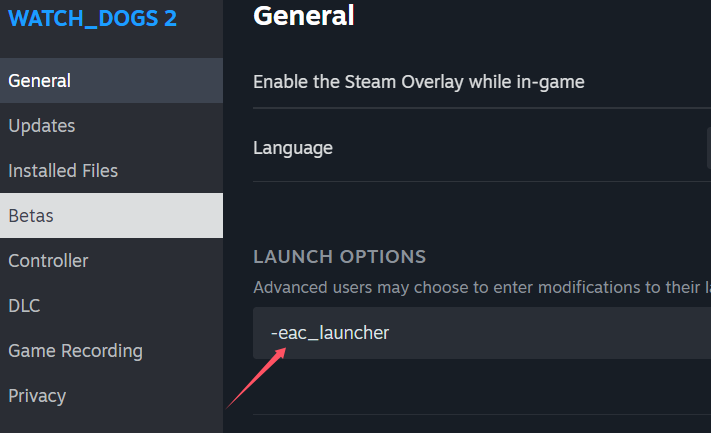
2. Click on General, then set the launch options. Enter -eac_launcher and click OK.
Note that there is a space before it.
3. Then click "Start Game," enter the game, open the GameBuff software, and click "Add a BUFF" to make modifications within the game.
- PowerWash Simulator 2
- SILENT HILL 2
- Palworld
- DRAGON QUEST I & II HD-2D Remake
- The Blood of Dawnwalker
- Dead Island 2
- The Elder Scrolls V: Skyrim Special Edition(steam)
- Hogwarts Legacy
- PEAK
- STAR WARS Zero Company
- Super Fantasy Kingdom
- No Man's Sky
- Yakuza 0 Director's Cut
- Sid Meier's Civilization VI
- Dying Light 2 Stay Human
- Onimusha: Way of the Sword
- Monster Hunter: World
- Need for Speed Unbound
- Wall World 2
- Sekiro Shadows Die Twice
- ACE COMBAT 7: SKIES UNKNOWN
- R.E.P.O.
- Age of Wonders 4
- Borderlands 3
- Stardew Valley
- Mount & Blade II: Bannerlord
- SWORD ART ONLINE Fractured Daydream
- Europa Universalis V
- MONSTER HUNTER RISE
- Anno 117: Pax Romana Demo
- DAVE THE DIVER
- Sons of The Forest
- Europa Universalis 5
- Assetto Corsa Rally
- Escape the Backrooms
- Resident Evil Village
- Anno 117: Pax Romana
- theHunter: Call of the Wild
- Assassin's Creed Odyssey
- Grand Theft Auto V Legacy
- ELDEN RING
- Dark Souls 3
- Phasmophobia
- How to Fish
- Horizon Forbidden West Complete Edition
- INAZUMA ELEVEN: Victory Road
- Hearts of Iron IV
- Assassin's Creed Valhalla
