
GameBuf ARMORED CORE VI FIRES OF RUBICON Anti-Cheat File Operation Process
Release time 2025/07/16
1. First, download the anti-cheat file by clicking on the “Anti-Cheat Download” link below or copying the URL below into your browser to download it.
https://dl.gamebuff.cn/tools/ARMOREDCOREVIFIRESOFRUBICON.zip
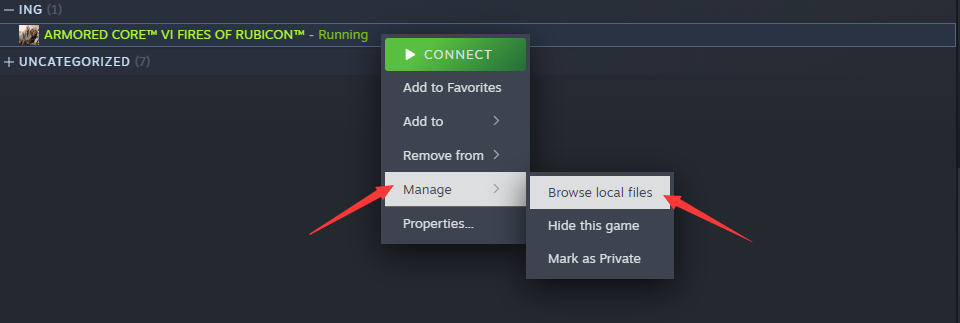
2. After downloading, extract the files to your desktop or another folder. Then open Steam, locate Armored Core 6, right-click and select “Manage,” then browse local files.
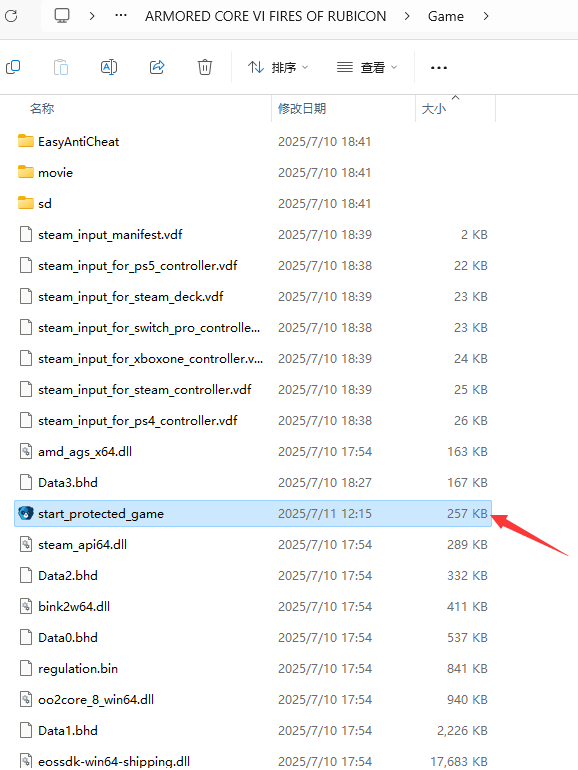
3. Copy “start_protected_game.exe” to the game directory \Game\ directory and overwrite it (it should be in the same directory as armoredcore6.exe).
4. After copying, you can click “Start Game” on Steam to enter the game, then open the GameBuff software and click “Add a BUFF” to modify the game.
- PowerWash Simulator 2
- SILENT HILL 2
- Palworld
- DRAGON QUEST I & II HD-2D Remake
- The Blood of Dawnwalker
- Dead Island 2
- The Elder Scrolls V: Skyrim Special Edition(steam)
- Hogwarts Legacy
- PEAK
- STAR WARS Zero Company
- Super Fantasy Kingdom
- No Man's Sky
- Yakuza 0 Director's Cut
- Sid Meier's Civilization VI
- Dying Light 2 Stay Human
- Onimusha: Way of the Sword
- Monster Hunter: World
- Need for Speed Unbound
- Wall World 2
- Sekiro Shadows Die Twice
- ACE COMBAT 7: SKIES UNKNOWN
- R.E.P.O.
- Age of Wonders 4
- Borderlands 3
- Stardew Valley
- Mount & Blade II: Bannerlord
- SWORD ART ONLINE Fractured Daydream
- Europa Universalis V
- MONSTER HUNTER RISE
- Anno 117: Pax Romana Demo
- DAVE THE DIVER
- Sons of The Forest
- Europa Universalis 5
- Assetto Corsa Rally
- Escape the Backrooms
- Resident Evil Village
- Anno 117: Pax Romana
- theHunter: Call of the Wild
- Assassin's Creed Odyssey
- Grand Theft Auto V Legacy
- ELDEN RING
- Dark Souls 3
- Phasmophobia
- How to Fish
- Horizon Forbidden West Complete Edition
- INAZUMA ELEVEN: Victory Road
- Hearts of Iron IV
- Assassin's Creed Valhalla
